
Your overview of
what's new.
A single place for installers, distributors and importers to follow TeledataOne product, software, firmware and service updates.
This is the partner overview of what is new at TeledataOne. We update it frequently as new features, product milestones and technical information are confirmed. Check back regularly for the latest status and details.

Key changes in this update
These are the main improvements and milestones partners may want to review first.
Faster firmware updates
About 5 minutes instead of 20.
Standard USB compatibility
Transfer OneConfig programming without a dedicated USB key.
OneLive quality visibility
A read-only view for exclusive distributors.
OneNext + OneSiren
Important hardware projects moving toward certification.
How to read the status labels: “Available now” means the function or material can be used today. “Improved” marks an existing feature or product that has been enhanced. “Coming next” marks a planned update. “In certification” means the product is going through certification. “In development” means the scope or timing may still change.
Browse every update
Search by product or function, filter by topic, or show only the updates with the status you need. Select “View details” to read the full explanation.
OneMini2 is available to order
The OneMini2 fire alarm control panel is available to order and can be certified. Product details are on the OneMini2 product page.
OneConfig Offline + Cloud
Prepare and manage projects with or without an internet connection. Organization branding options are available in both environments.
Any standard USB drive can be used
Transfer programming between OneConfig and the control panel with any standard USB drive. Dedicated USB hardware is no longer required.
OneConfig 2.0: RS232 programming and live diagnostics
The next configurator keeps the existing cloud workflow and adds direct RS232 programming in Phase 1, followed by live diagnostics on the technician's laptop in Phase 2.
OneLive worldwide and country view
Super Admin can view installations worldwide. Exclusive distributors can see installations in their own country, including systems installed by other companies, in read-only mode.
OneLive vector maps and zoomable plans
Vector maps will allow zooming in and out of detailed floor plans, including large sites such as airports. A structured image hierarchy is also planned.
Firmware updates are 4× faster
Update time has dropped from approximately 20 minutes to approximately 5 minutes, reducing time on site and customer downtime.
Additional System Vulnerability Solved
An additional system vulnerability has been solved. Contact Teledata for more information about the correction.
Customer logo upload by USB
Teledata sends a logo-only file. The partner or customer can upload it directly to the control panel on site, without returning the panel to the factory.
More control panel configuration functions
Auto-addressing, technological input functions such as Reset, Silence and Key, independent Base Sounder output control, and mimic panel management.
Network-wide enable and disable
Enable or disable devices, zones, loops and outputs from a panel in the network, including output groups and all outputs.
Improved sounder synchronization
Teledata has achieved a significant synchronization improvement across different protocols. The next OneSiren generation is expected to take this to a perfect level.
OneMini Gas
A dedicated gas control unit for wired 4–20 mA gas detectors through the ONEMODULE420 module.
Lock Key Cabinet
The cabinet door is now available with a metal-key lock. Previously, access was secured with screws only.
OneSiren: new sounder platform NEW
Wall, ceiling and flush-mount options, 32 selectable tones and sound output listed at 100–105 dB at 1 m depending on tone. Certified EN 54 Part 3 and Part 23, with Part 23 at only 9 mA: a world record.
OneNext with 7-inch touchscreen NEW
OneNext adds a larger 7-inch touchscreen, removable top connectors, support for cables up to 2.5 mm² (AWG 12), and plug-and-play boards.
Smoother detector opening and closing
The opening and closing rotation is smoother, and the gap between detector head and base is smaller for easier installation and a cleaner finish.
QR code labels on loose PCBs
Loose expansion boards and control-panel components now carry QR labels for faster identification, traceability and support.
Series X: efficient, optimized configuration
A high-efficiency product line with optimized functions, designed for local installations and markets with strong price pressure.
Smoke Management with selected customers
Teledata is working with selected customers on a dedicated board and firmware functions for input/output status and OneMimic LED indication.
Detailed reports for returned boards
For boards returned to Teledata, a detailed failure report can be provided on request through your Teledata contact.
Teledata General Catalogue
Download the current General Catalogue to review the Teledata product range.
Updated partner presentation
The latest company and product presentation is available for partners upon request.
Product demos and technical training
Request a OneLive or OneConfig demo, a OneConfig 2.0 preview or additional technical training for your team.
Old news
Earlier news from the current news archive.
- See what we’ve been up to lately: references and Design brochure
- We will be exhibiting at the Sicurezza Tradeshow, Milan 2023
- FIREX 2023: certain English appointments you just can’t miss
- New, Stylish, Available… On-time deliveries for 2022
- Intersec Dubai 2020: One Family
- Your technological partner: fire detection specialists
- Intersec Dubai 2019: innovating for a safer world
- One Mini: become a fire expert in one touch
- One Mini: Small is Huge
Need a closer look?
Request a OneLive or OneConfig demo, arrange technical training, or contact your Teledata representative about a specific update.
OneConfig today. OneConfig 2.0 next.
Keep the workflow you already know: prepare and manage projects online or offline, then transfer programming to the control panel with a standard USB drive. OneConfig 2.0 adds a direct RS232 connection and, in its next phase, live diagnostics on the technician's laptop.
OneConfig: Cloud + Offline
Prepare and manage your projects in the cloud or offline, depending on the working environment.
- Prepare and manage projects without an internet connection.
- Use cloud-based project management when connected.
- Apply branding options for your organization in both environments.
- Transfer the programming to the control panel with any standard USB drive.
Any standard USB drive. No dedicated key.
USB compatibility is no longer limited to selected models. Technicians can transfer programming between OneConfig and the control panel using a normal USB drive.
Prepare
Create or update the project in OneConfig, online or offline.
Transfer
Save the programming to any standard USB drive.
Load
Move the programming to the control panel. No dedicated USB hardware is needed.
OneConfig 2.0
Everything you already do with OneConfig in the cloud - with a new direct serial connection to the control panel. Developed in-house by Teledata, OneConfig 2.0 extends the current workflow with RS232 programming and live diagnostics.
Cloud programming via USB remains part of the OneConfig 2.0 environment.
Work directly with the panel through a serial connection when an offline workflow is required.
Phase 2 will bring live diagnostic information directly to the connected computer during commissioning and troubleshooting.
Full panel programming via RS232
Alongside cloud programming via USB, OneConfig 2.0 will support complete offline programming through an RS232 connection. The panel firmware already includes RS232 support from the previous generation, helping make the first release path faster.
Real-time diagnostics on the laptop
The same RS232 connection will provide live diagnostic information on the technician's laptop during commissioning and fault-finding.
Want an early look? A preview demo can be arranged shortly. Contact Teledata to discuss a demonstration for your team.
Request a OneConfig 2.0 preview
See the current Cloud and Offline workflow and discuss the upcoming RS232 connection and live diagnostics.
OneLive: a wider view of fire system quality, from site to country.
OneLive helps monitor connected installations remotely. Its country-level view gives Teledata and exclusive distributors a broader picture of the installed base and the quality of maintenance across a market.
Worldwide view for Super Admin. Country view for exclusive distributors.
Super Admin can see connected installations worldwide and filter them by country. Exclusive distributors can view installations in their own country, including sites installed by other companies.
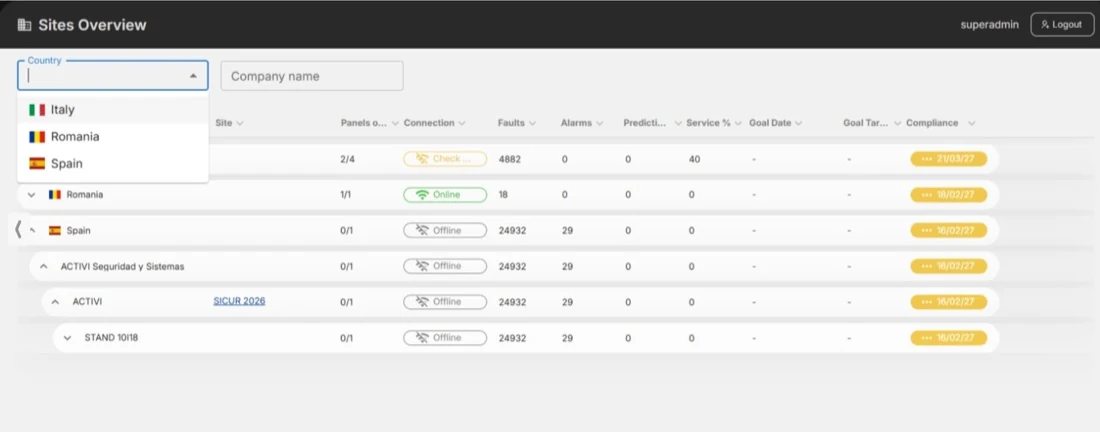
OneLive country selector and sites overview.
Monitor the quality of fire protection in your market - with Teledata's expert view, at no additional cost.
The distributor view is for viewing only. It does not provide control of other companies' installations or any editing. It gives exclusive distributors a wider picture of the installations in their country and supports quality monitoring across the market.
Vector maps and zoomable floor plans
Planned availability: December 15, 2026. Vector-based maps will let technicians zoom in and out of detailed floor plans - including very large sites such as airports - while keeping the map clear. The update will also support a structured hierarchy for organizing site images and plans. The vector map update is also a key step toward replacing the legacy WinWatch Monitoring Station software with OneLive.
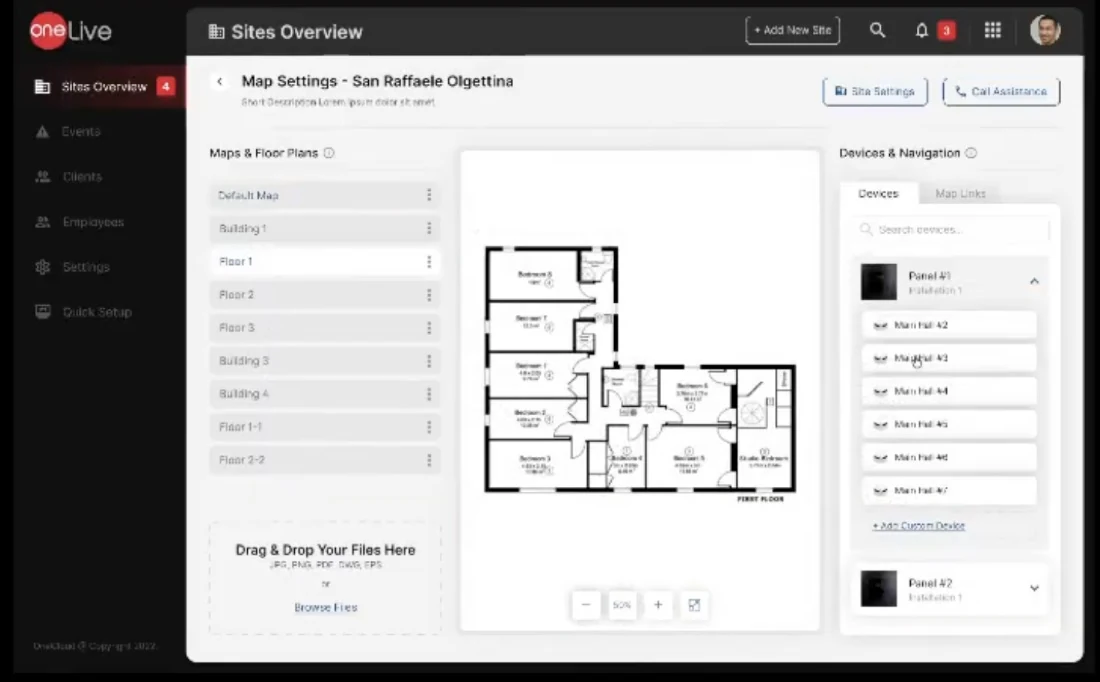
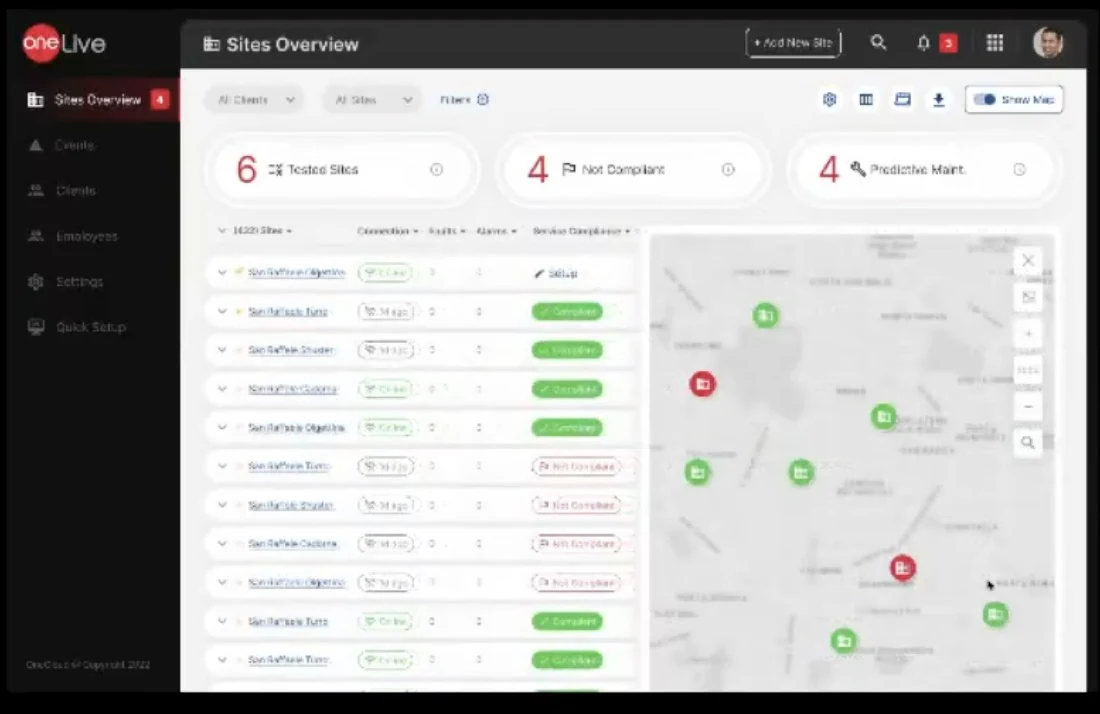
Remote monitoring
Review connected systems and site information remotely.
Predictive maintenance
Use system information to support maintenance planning.
Quality visibility
Understand the installed base across a country, not only the sites managed by one company.
See OneLive in action
Request a demonstration of the worldwide and country-level views, or ask about the upcoming vector map update.
More control at the panel. Less work on site.
These updates belong to the control panel and its firmware. They make commissioning, maintenance and day-to-day operation easier - independently of the OneConfig software.
Firmware updates are four times faster
The update process has been reduced from approximately 20 minutes to approximately 5 minutes.
Why it matters: less time in the field and less downtime for the end customer.
Update time comparison
Approximate times supplied by Teledata.
Additional System Vulnerability Solved
An additional system vulnerability has been solved. For more information about the correction and the related firmware update, please contact Teledata.
Contact us for more information →More configuration functions on the control panel
These are panel functions. They should not be confused with OneConfig, which is the software used to prepare and manage projects.
Customer logo upload by USB
Teledata prepares a file containing only the customer's logo and sends it to the partner or customer. The customer can upload it directly to the control panel using USB.
Why it matters: the upload can be completed on site. The panel does not need to be sent back to the factory for this operation.
Automatic device addressing
Devices receive their addresses automatically, reducing manual work and the risk of commissioning errors.
New technological input functions
Inputs can be programmed with functions such as Reset, Silence and Key.
Independent Base Sounder output
The programmable remote output of a Base Sounder can be enabled or disabled independently.
Mimic panel management
Mimic panel management is supported as part of the control panel feature set.
Enable or disable elements from any panel in the network
Manage the enable/disable state of elements across the network from a panel in the network. This is especially useful during system testing and maintenance because the technician does not need to visit every panel individually.
Better sounder synchronization across protocols
Teledata has achieved a significant and valuable improvement in sounder synchronization, including between different protocols.
The next OneSiren generation is expected to take this further and reach a perfect level of synchronization.
Current improvement and next step
- Today: improved synchronization across different protocols has been achieved.
- Next: the new OneSiren platform is expected to deliver perfect synchronization.
Need technical details?
Ask Teledata for firmware information or a technical session on panel and network functions.
New products. Better installation details. Two major projects.
Explore the latest product additions and hardware improvements. OneNext and OneSiren are presented in more detail because they bring important benefits to installation, maintenance and system performance.
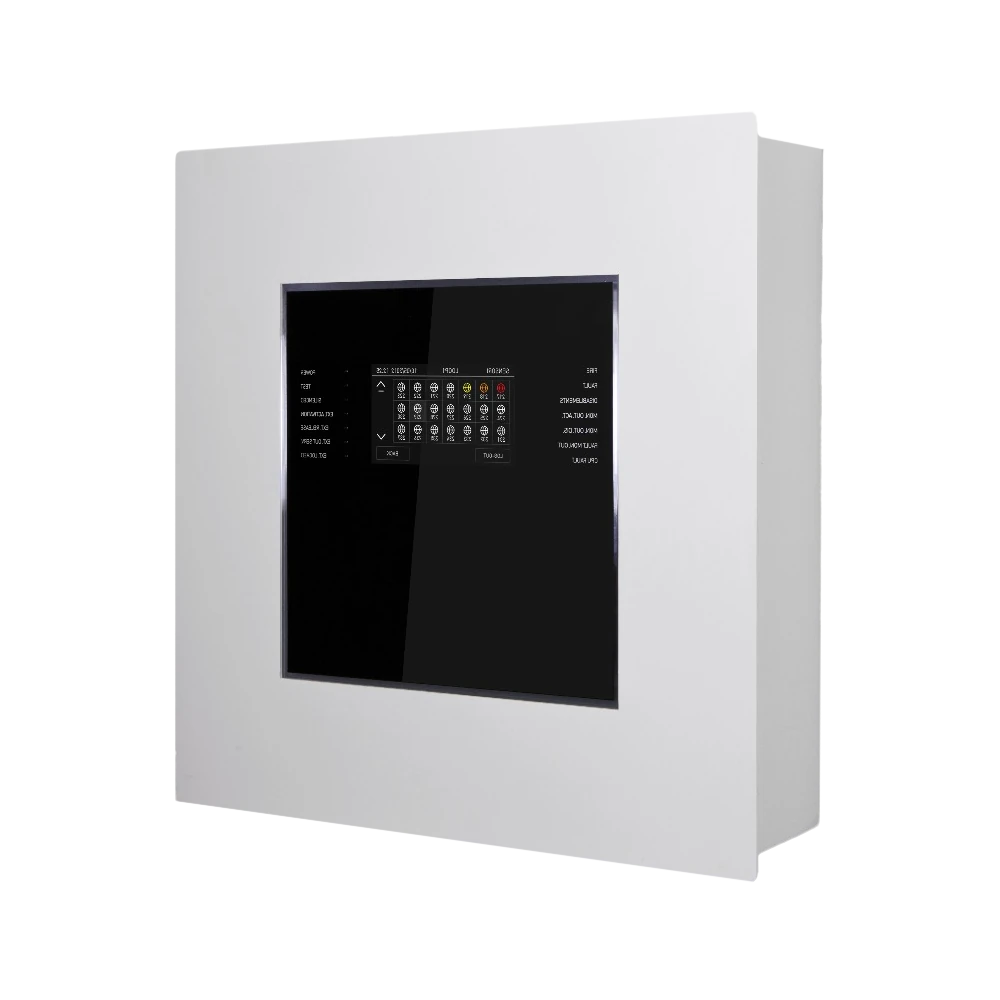
OneMini2
The OneMini2 fire alarm control panel is available to order and can be certified. Product details are on the OneMini2 product page.
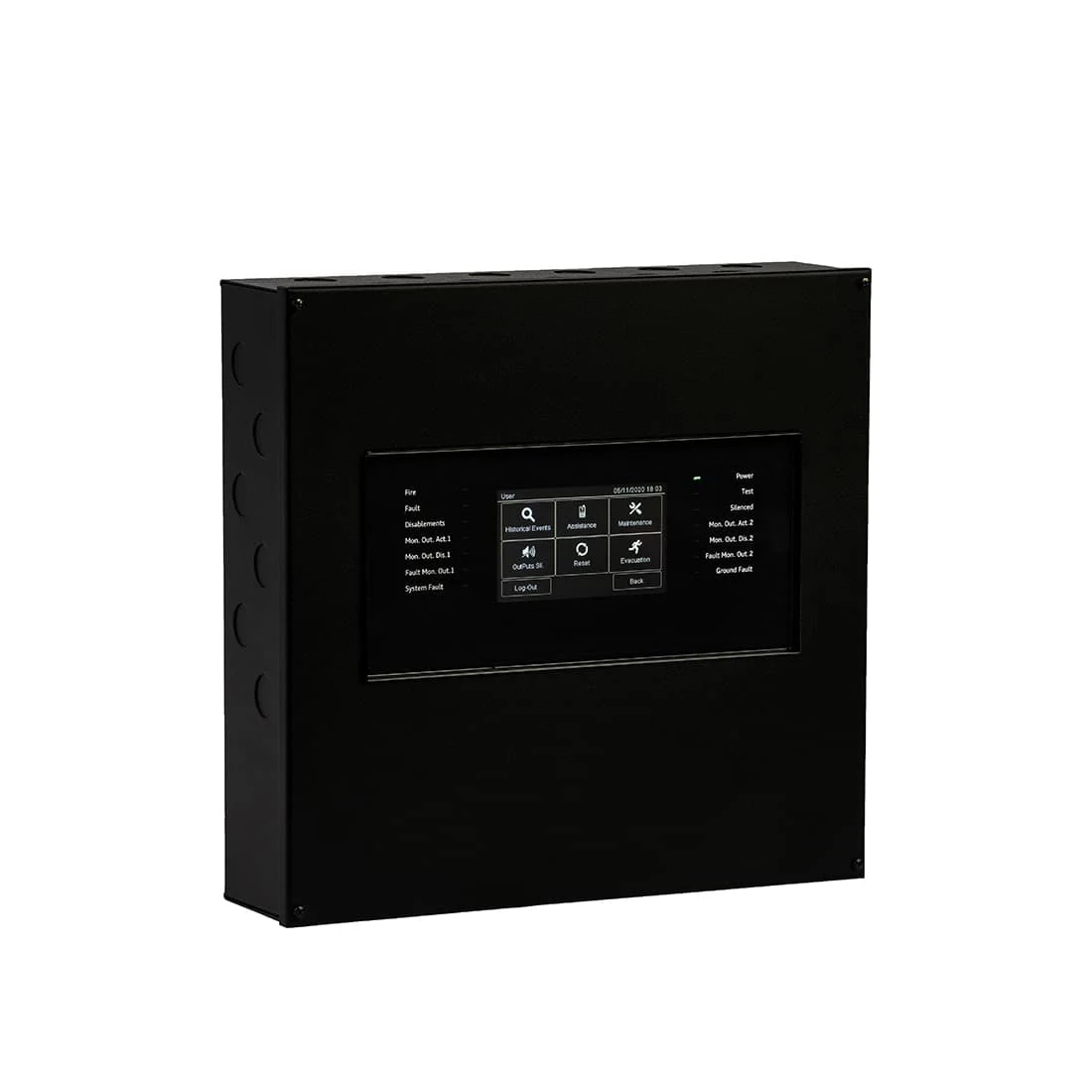
OneMini Gas
A dedicated gas control unit for wired 4–20 mA gas detectors through the ONEMODULE420 module. The product is designed for gas detection applications and provides touchscreen programming and interrogation.
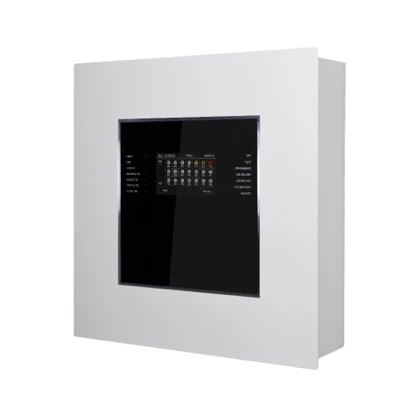
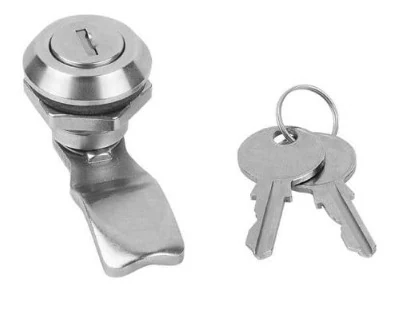
Lock Key Cabinet
The TeledataOne cabinet door is now available with a metal-key lock. Previously, access was secured with screws only. The lock adds another option for protecting the control panel and controlling access.
OneNext - a new control unit designed for easier installation and maintenance NEW
OneNext combines a large 7-inch touchscreen with hardware changes that make cabling and board replacement easier. The current target is to enter certification towards the end of December 2026 or in early January 2027.

Certification target: late December 2026 / early January 2027.
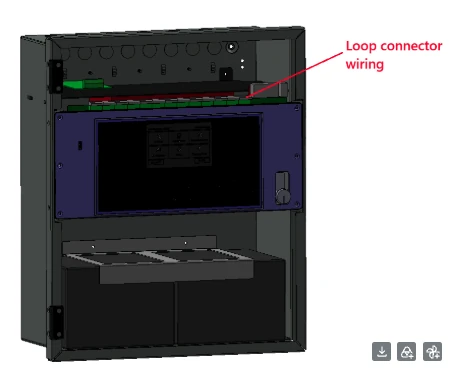
Easily accessible connectors
All connectors are removable and positioned at the top of the unit to make cabling easier.
Larger cable cross-section
All connectors support cables up to 2.5 mm² (AWG 12).
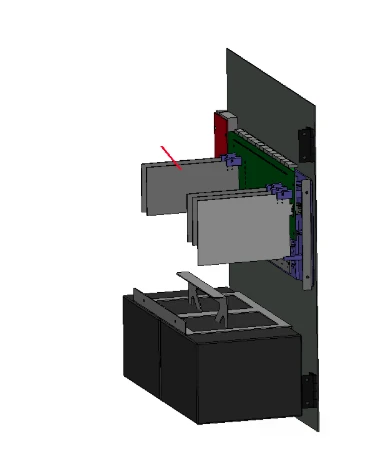
Plug-and-play boards
Boards can be replaced quickly, helping reduce maintenance time.
 In certification · Expected availability January 2027
OneSiren - a new sounder platform with more installation options NEW
The Most Energy-Efficient Siren in the World
OneSiren is a new low-power sounder design developed for wall, ceiling and flush mounting. It offers sound-only and sound-plus-flash versions, multiple tones and finish options. Certification is in progress; availability is currently expected in January 2027.
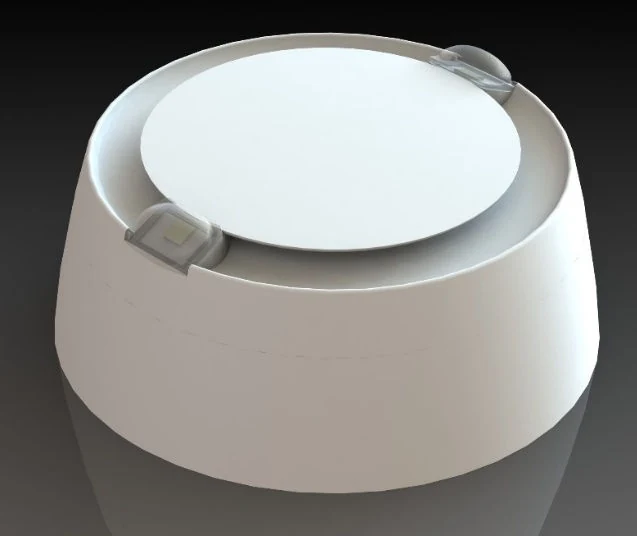
Sound and flash, sound only, and a flush-mounted version.
Wall and ceiling mounting, plus a flush-mounted version.
A choice of 32 different tones.
White, red and custom colors, subject to quantities.
Certified EN 54 Part 3 and Part 23. Part 23 with just 9 mA is a world record.
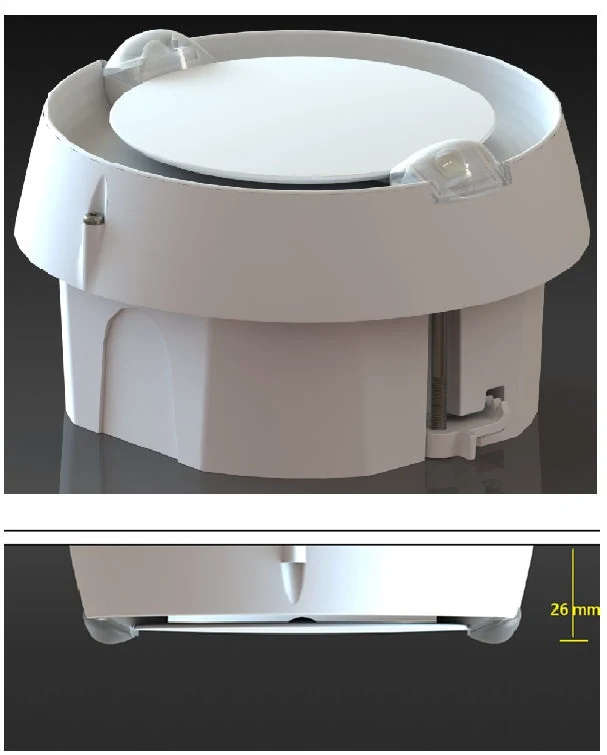
Technical values are taken from OneSiren datasheet v1.1 (March 12, 2026). The product is still in certification; final certified specifications and availability will prevail.
Smaller changes that make installation easier
Smoother detector opening and closing
The opening and closing rotation is smoother, and the gap between the detector head and base has been reduced. This makes installation easier and gives the detector a cleaner finish.

QR code labels on loose PCBs
All loose boards, including expansion boards and control-panel components, now carry QR code labels. This helps identify and trace boards faster and supports technical assistance.
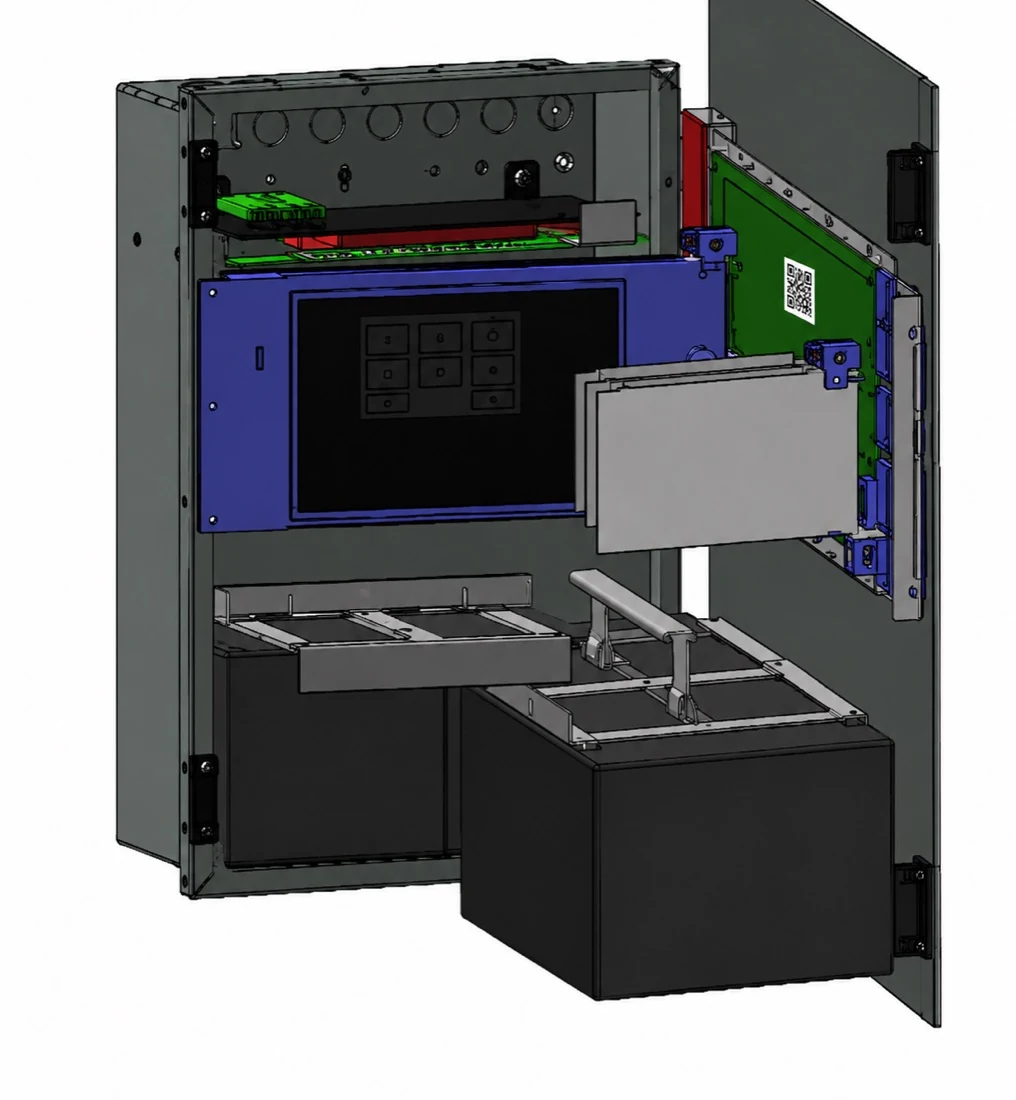
The small label shown on the board illustrates how the QR code can be immediately visible during identification and support.
ONE2 board information ↗Series X - efficient functions for price-sensitive markets
A high-efficiency line with an optimized feature set, designed for local installations and markets with strong price pressure.

Series X compared with the One Line
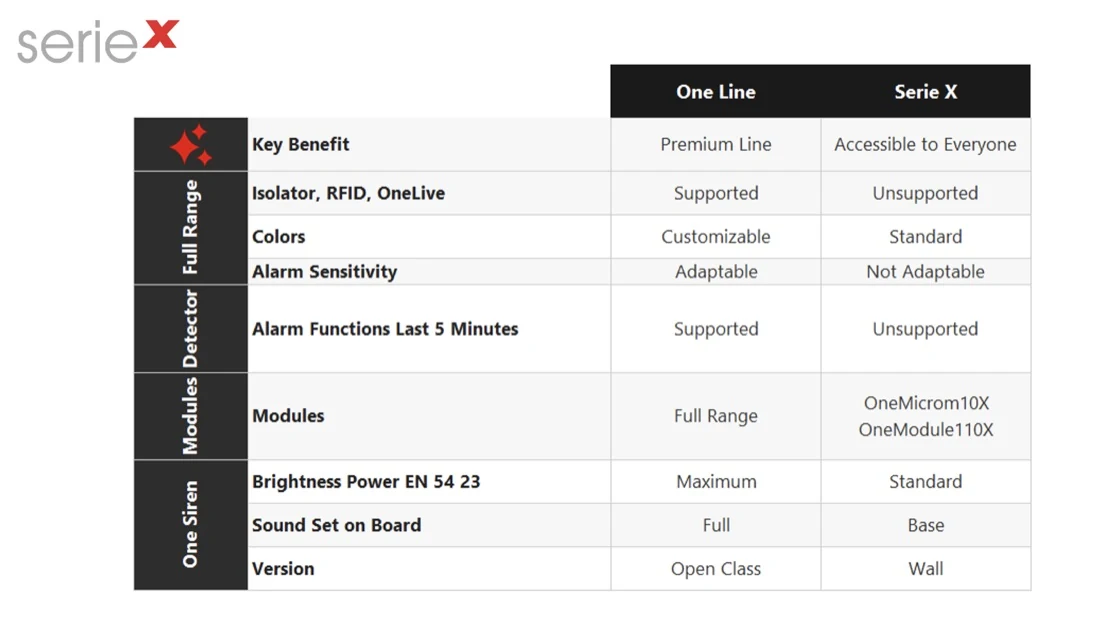
Comparison image supplied by Teledata. Kept separate from the Series X logo.
Discuss product availability or a project
Ask your Teledata representative for product information, technical details or a commercial presentation.
Smoke Management: development in progress with selected customers.
We are working with selected customers on the development of a dedicated board and firmware functions for smoke-control applications.
Customer-led development
We are working with a number of customers to develop a board and related functions for Smoke Management. The scope below describes the current technical direction; final implementation and release timing are still under development.
From an input status to controlled equipment
Technological inputs can be used to change the state of programmed relay outputs. These outputs may operate equipment such as lifts, fire dampers, AHUs (Air Handling Units) and other fire-safety devices.
Input and output management
The current proposal uses the Teledata OneModuleXXX range connected to the fire panel loop. The input and output relay can be implemented using ONEMODULE120, ONEMODULE110 or ONEMODULE310.
- Configure the input as a technological input in the panel.
- Input events appear in yellow in the TeledataOne menu, instead of red alarm-event display.
- The technological input does not activate the fire-panel alarm function.
- Use the panel's programmable logic to activate the related outputs.
Visible ON / OFF status
Both input and output states need to be clearly indicated as ON or OFF. An LED indication is part of the proposed user experience, so the operator can identify the status at a glance.
OneMimic LED status management
The upgraded OneMimic board connects to the TeledataOne panel via RS485. Up to 16 OneMimic boards can be connected to the system.
- Each LED can be assigned to follow the state of an input or an output.
- LEDs show two states: ON (illuminated) and OFF (not illuminated).
- Programming is intended to be performed directly from the Teledata control panel.
- Firmware development is required to associate each LED with the selected input or output.
Mimic panels across a network
In a networked fire-panel system, the mimic board of each panel can manage LEDs associated with inputs and outputs connected to that panel's loops. Mimic-panel LEDs can also be managed from other panels connected in the same OneRing network.
The new Smoke Management application combines this network architecture with additional firmware work and customer-specific requirements.
Discuss a Smoke Management project
We are collecting requirements with selected customers. Contact Teledata if you have an application to evaluate.
Technical support and partner materials.
Access the updated product catalogue, request the partner presentation or ask for a detailed report on a returned board.
Returned-board failure reports
For electronic boards returned to Teledata, a detailed failure report can be provided upon request. Contact your Teledata representative and ask for a report for the returned board.
Request a failure report →Teledata General Catalogue
Download the current general catalogue to review the Teledata product range and the products included in the portfolio.
Download catalogue PDF ↗Partner presentation
The updated company and product presentation is available for partners. Contact Teledata to request a copy.
Request presentation →Product demos and technical training
Ask for a OneLive or OneConfig demonstration, or arrange an additional technical session for your team.
Request a demo or training →Need help with a specific update?
Tell us which product, panel or software function you are working with. We will direct your request to the right Teledata contact.


